

What Is A vCIO? A Practical Guide To IT Leadership, Budgets, And Risk


Table of Contents
Technology choices now shape budgets, approvals, and security reviews. They also affect employee access, software renewals, and customer response times. That is why “what is a vcio” is more than a title question. A virtual cio is an outside leadership role that helps align IT decisions with business priorities, so teams can approve work with clearer costs and risks.
Isabelle Pomeroy, Security Analyst at Contigo, notes: “Good technology leadership turns scattered IT requests into clear priorities, so finance and operations can approve work with fewer surprises.”
What Is A vCIO In Business Planning
A vCIO is an outside technology leadership role that helps a business make better IT decisions without adding a full-time executive seat. The role connects technology choices to company goals, spending priorities, risk management, and operational planning. In practical terms, it helps leaders decide whether a software renewal or security tool deserves budget now. A device refresh or cloud change may need to wait.
Key examples of this include:
-
Technology roadmap planning: Turning requests from finance, operations, and sales into a practical upgrade sequence.
-
Budget guidance: Reviewing renewals, invoices, and device needs before teams approve avoidable purchases.
-
Vendor review: Comparing contracts, support terms, and service gaps before another tool enters the workflow.
-
Security priority setting: Ranking access controls, backups, and employee training by business risk.
-
Leadership communication: Translating IT tradeoffs into approval-ready language for owners and managers.
What Is A Virtual CIO Responsible For
A useful answer to what is a virtual cio starts with daily responsibility. The role helps reduce approval delays and improve software decisions. It can also clarify security priorities, smooth onboarding, and limit surprise costs. That work matters when a new hire needs Microsoft 365 access by Monday, a department head wants a new app, and finance needs to place license costs in the right quarter.
Consider a growing Austin business with sales, operations, and accounting teams. Those teams use shared files, Teams channels, and vendor portals. Help desk tickets show repeated access problems, while managers approve tools through email threads. A vCIO organizes those signals into decisions that reduce rework, missed handoffs, and last-minute approvals.
The role turns daily friction into planning inputs.
Typical capability areas include roadmap planning, budget alignment, vendor management, and security prioritization.
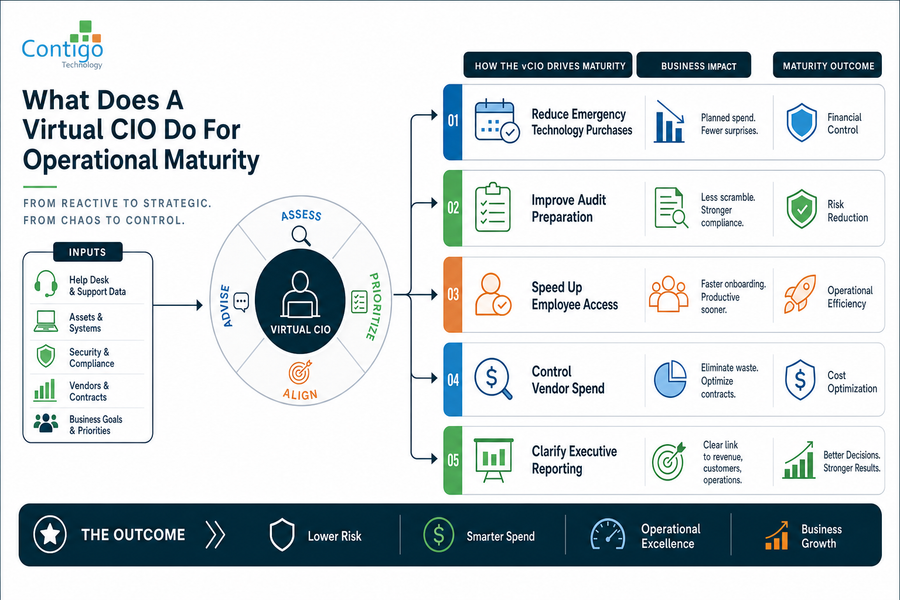
What Does A Virtual CIO Do For Operational Maturity
When leaders ask what does a virtual cio do, the clearest answer is that the role helps IT move beyond reactive fixes. Managed support and vCIO work are different categories. Managed IT support keeps tickets, endpoints, and Microsoft 365 users supported day to day. A vCIO role typically defines priorities, approvals, and reporting.
Examples of this idea are:
-
Reduce emergency technology purchases: Teams review renewal dates, aging laptops, and firewall needs before they become urgent invoices. Finance can plan spend instead of approving last-minute exceptions.
-
Improve audit preparation: Teams organize security policies, user access lists, and backup evidence before a customer review or compliance request. Cleaner records reduce scramble time.
-
Speed up employee access: Teams map onboarding steps across HR, Microsoft 365, payroll, and line-of-business apps. New employees start with the right permissions sooner.
-
Control vendor spend: Teams review contracts against actual usage and ticket history. Duplicate tools and unused licenses become visible before renewal.
-
Clarify executive reporting: Leaders see which risks affect revenue, customers, and operations. Reports become easier to approve because they connect systems to business consequences.
Explore IT Strategy And Support
How A vCIO Shapes Better IT Decisions
Before making larger IT decisions, an organization can prepare by organizing facts behind current systems, support needs, and budget pressures. Change affects people, approvals, vendors, and customer-facing workflows. The best starting point is evidence from systems already in use rather than a wish list. A vCIO discussion works best when teams can show where time, money, and risk are already being lost.
Key examples of this include:
-
Document current systems: List core apps and servers. Include endpoints, Microsoft 365 tenants, shared drives, and each approval owner.
-
Map recurring tickets: Connect repeated password resets, access delays, printer issues, or app errors to lost time and customer handoffs.
-
Review Microsoft 365 usage: Check licenses, inactive accounts, shared mailboxes, and Teams sprawl before adding subscriptions.
-
Identify security gaps: Note missing MFA, stale accounts, unmanaged devices, and weak vendor access.
-
Assign decision ownership: Define who approves renewals, exceptions, access changes, and budget requests.
Get Clearer IT Leadership
Turn scattered IT requests into a practical roadmap. Contigo helps align budgets, risk, and technology decisions.
Choosing Support After Understanding Virtual CIO Needs
Understanding the vCIO role helps organizations separate technology leadership needs from daily managed IT support needs. Those needs may include tickets, monitoring, and Microsoft 365 administration plus endpoint and security requests. Contigo does not offer vCIO services or professional IT consulting services, and that boundary helps protect budgets, approvals, and service expectations. Organizations can contact Contigo for managed IT support and cybersecurity support along with Microsoft 365 support plus responsive help desk support and 24/7 proactive monitoring from an Austin team with 12 years of experience, over 120 clients, more than 4,500 supported end users, and a 96.61% CSAT rating.